Employee
Browse, search, and manage employee records.
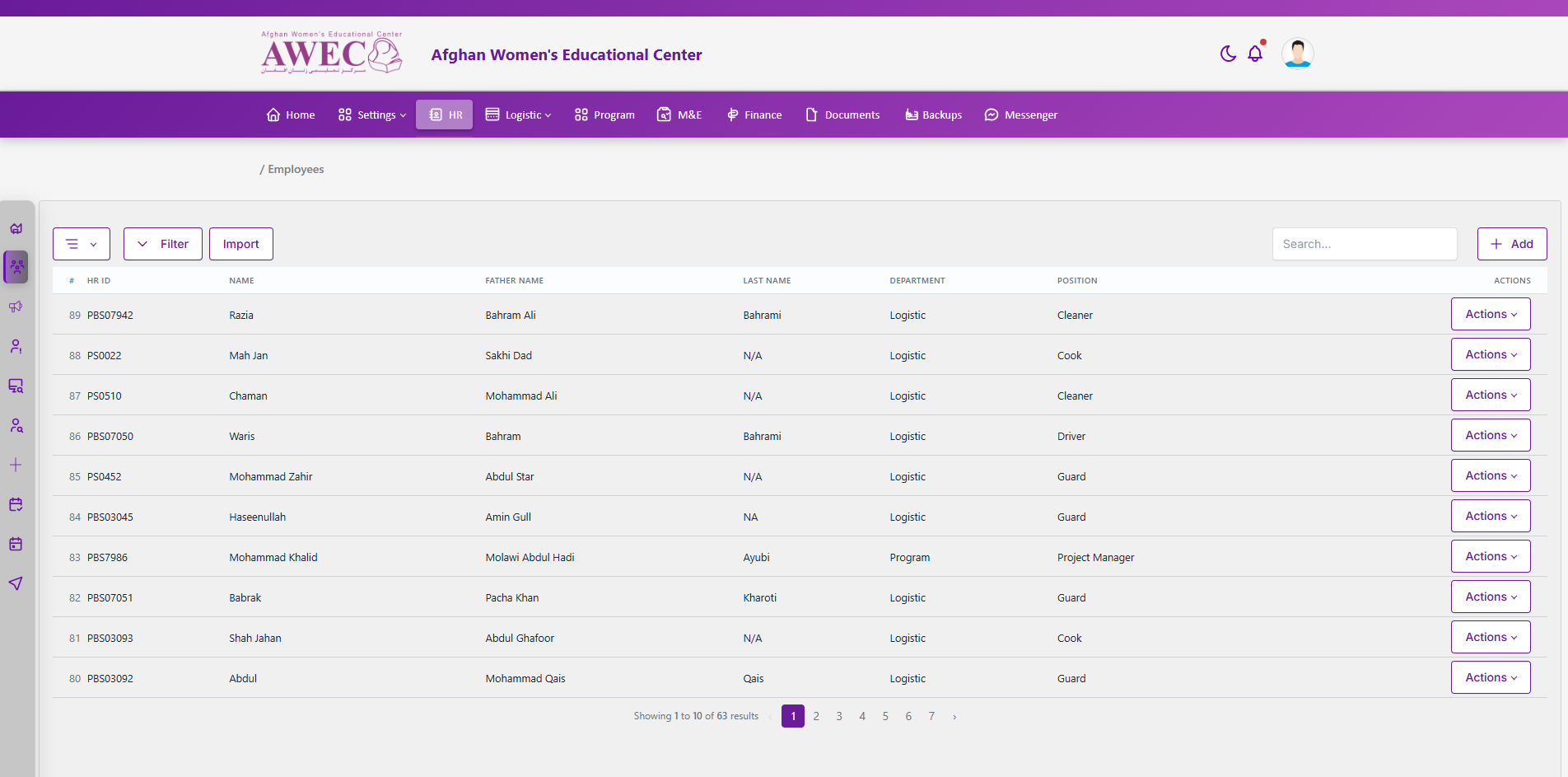
Access
- Requires “view employees”; other actions need additional permissions (create, edit, delete, print, contracts, etc.).
UI overview
- Menu button (⋮): Export, Select Properties (modal), With details, Master Payroll (if permitted)
- Filter toggle: expands a collapsible filter panel
- Quick actions: Import, Search, Add (if permitted)
- Table columns: #, HR ID, Name, Father Name, Last Name, Department, Position, Actions
Filters (collapsible panel)
- Province, Marital Status, Department, Designation, Gender, Year, Status (Active/Inactive)
Actions menu (per row)
- Edit, Delete (permissions apply)
- Create a User (for the employee)
- Forgot password (send reset)
- Supporting docs (upload)
- Details (opens profile page)
- Print, Contract Amendment, Temporary Contract, Employment Contract, HR Letter
Modals
- Select Properties: choose columns to include and apply additional filters (Province, Branch, Department, Designation, Duty Station); supports Copy/Print/Excel export of the filtered table.
- Create User: create a system user for the employee.
Notes
- Pagination is shown below the table.
- Export actions exist both at the menu and within the Select Properties modal for filtered exports.